
Taxonomy Switcher
Move terms to another taxonomy. In one step.
Turn tags into categories, or move a branch of terms into a custom taxonomy, without recreating anything by hand. Posts keep their terms.
Free on WordPress.org · Maintained by WebDevStudios
2,000+active installs
74K+downloads
5.0/5WordPress.org rating

Restructure your terms without the busywork
Switch every term
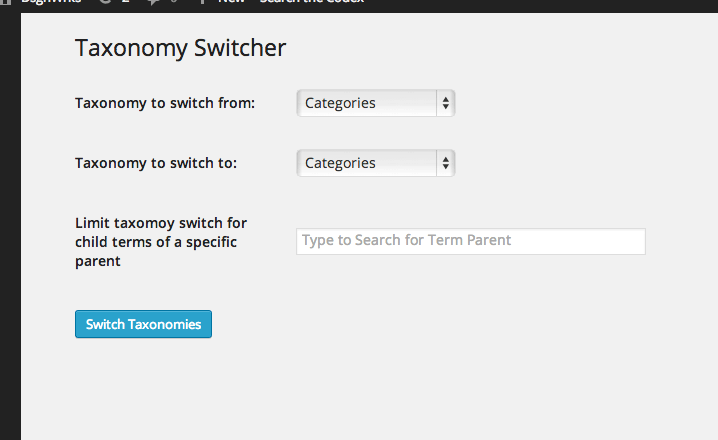
Pick a From and a To taxonomy and move them all.
Or just one branch
Choose a parent term to move only its children.
Live term search
Start typing a term name to find parent terms.
Specific terms
Give a comma-separated list of term IDs to move only those.
WP-CLI
Run wp taxonomy-switcher for large sites or scripted migrations.
Open source
Issues and pull requests welcome on GitHub.
How it works
- Back up your database.
- Install and activate the plugin, then open its admin page.
- Choose the From and To taxonomies, and optionally a parent term.
- Run the switch.
With no parent term or term IDs set, every term in the From taxonomy moves.
Help and resources
Support forum
Ask on WordPress.org. We answer there.
GitHub
Report issues and send pull requests.
Changelog
What changed in each release.
Questions
Do posts keep their terms?
Yes. The terms move to the new taxonomy and stay attached to the same posts.
What if I don’t pick a parent term?
Every term in the From taxonomy is moved.
Can I undo it?
Back up first. You can switch terms back, but it’s a bulk change, so a backup is the safe undo.
Does it work from the command line?
Yes. Run wp taxonomy-switcher for the options.
Get Taxonomy Switcher
Free on WordPress.org.