
WP Search with Algolia Pro
AI search that learns what your customers buy.
Algolia’s AI ranks results by what people actually choose. Pro feeds it everything it learns from: every cart, checkout and order tied back to the search that started it, plus your prices, ratings and custom fields. The more you sell, the better your search gets.
30-day refund guarantee · Built by the team that maintains WP Search with Algolia
The free plugin connects WordPress to Algolia. Pro makes its AI work for your business.
Free WP Search with Algolia indexes posts and gives you Autocomplete and a search page. Algolia’s AI features can only be as good as what they’re told. Pro tells them what shoppers do after they search, and sends the data that decides what people find: prices, SKUs, stock, ratings and your custom fields.
AI search AI
Teach Algolia’s AI which results turn into sales.
→ Re-ranking, personalization, NeuralSearchWooCommerce
Search by SKU, price and popularity. Hide what’s sold out.
→ SKU, price, stock, ratingsCustom fields
Make ACF, Meta Box and CMB2 fields searchable and filterable.
→ Meta Field MapperIndex control
Only index what should be found, and see that it’s working.
→ Noindex, exclusions, healthMultisite
One search across every site in your network.
→ Network-wide indexAlgolia’s AI learns from what sells. Pro is how it finds out.
Following a shopper from search to sale
Each search gets an ID from Algolia. Pro carries that ID through the store, so a sale counts for the search that led to it.
Search that gets better on its own
Algolia’s Dynamic Re-Ranking moves the results that convert to the top for each search. It needs conversion data to do that, which is what Pro sends.
- Cart, checkout, order and coupon eventsSent to Algolia’s Events API from WooCommerce. Switch each one on or off.
- Tied to the right searchPro picks up the query ID from Autocomplete and the search page and keeps it for Algolia’s 30-minute attribution window.
- Richer records, smarter matchesPrices, ratings, sales and mapped custom fields give AI ranking and NeuralSearch more to understand than a title and a paragraph.
- Works with what you haveUses the free plugin’s Insights connection. Flip one switch in each and events start flowing.
- 1
 Ridgeback 2 Mountaineering Tent$309.95 · 3-Seasonsteady
- 2Talus 2 Ultralight Tent$224.95 · All-Season▲ top seller for “tent”
- 3Driftwood 3 Car Camping Tent$249.95 · 3-Season▲ high add-to-cart
- 4Basecamp 4 Family Tent$369.95 · 3-Season▼ clicked, rarely bought
- 5Talus 1 Ultralight Tent$499.95 · 4-Seasonsteady


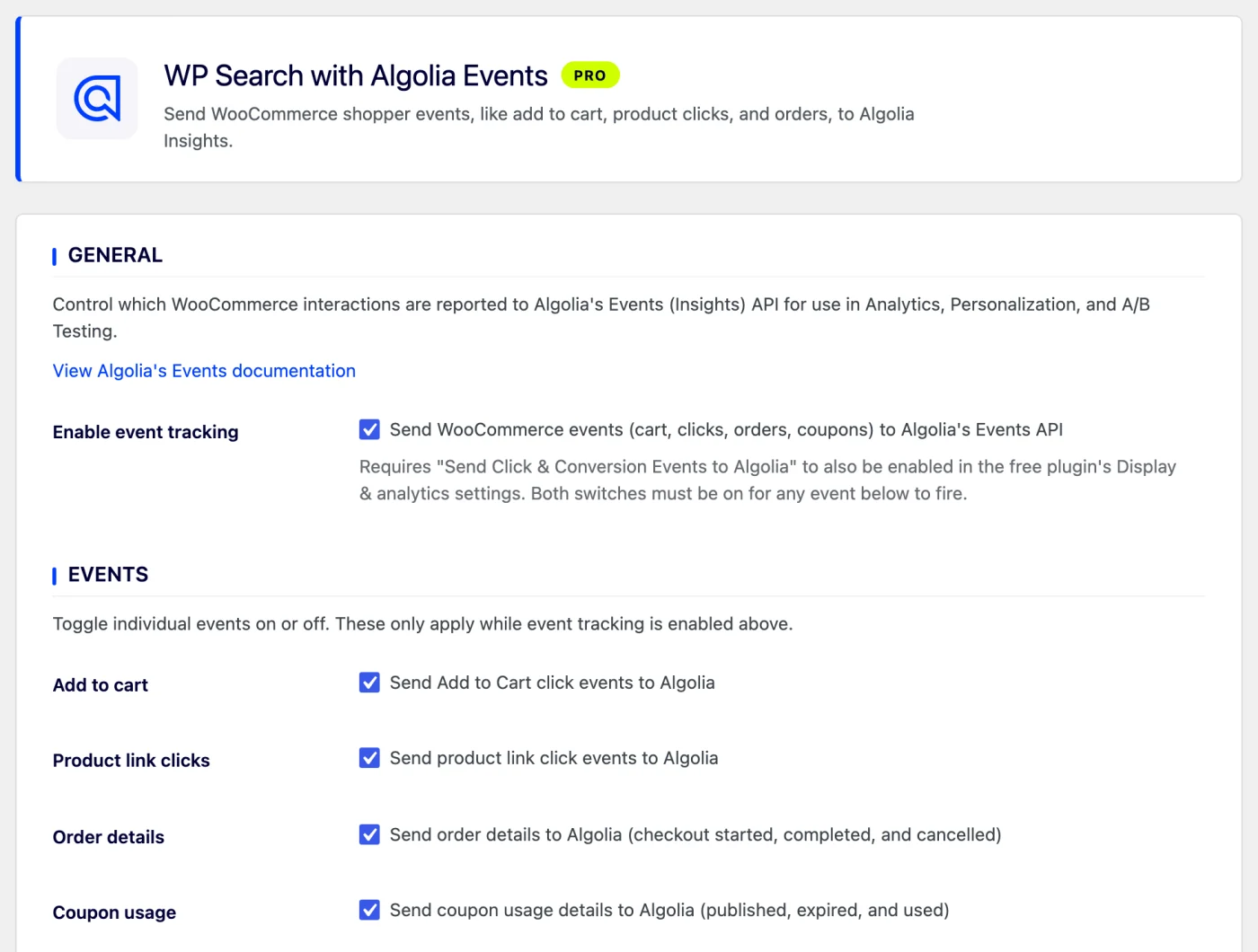
Real settings screen · WooCommerce events added in 1.8
Dynamic Re-Ranking
Results that turn into sales move up for each search, automatically.learns from → Pro’s conversion eventsPersonalization
Returning shoppers see the brands and categories they buy first.learns from → clicks, carts, ordersNeuralSearch
Understands “warm tent for winter” even when no product says those words.learns from → your records + conversionsAI Recommendations
Train models like “frequently bought together” on your real orders.learns from → Pro’s order eventsA/B tests on revenue
Test ranking changes and judge them by orders, not just clicks.measured with → conversion eventsWhich searches sell
See the searches that make money and the ones that find nothing.reported from → search + order eventsThese are Algolia features. You switch them on in your Algolia dashboard, and some depend on your Algolia plan. Pro doesn’t add its own AI; it sends Algolia the events and product data these features learn from.
Product search that knows it’s a store
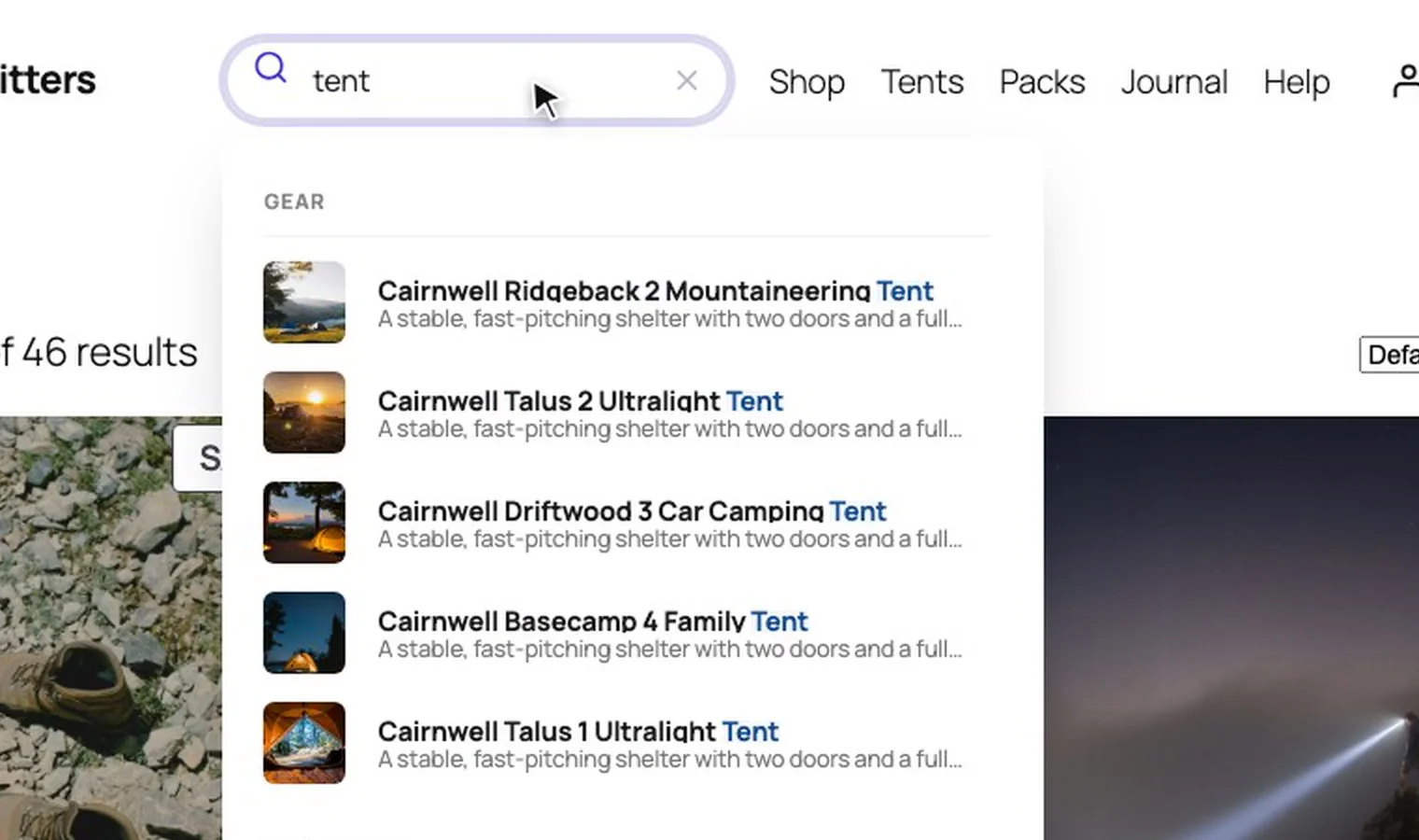
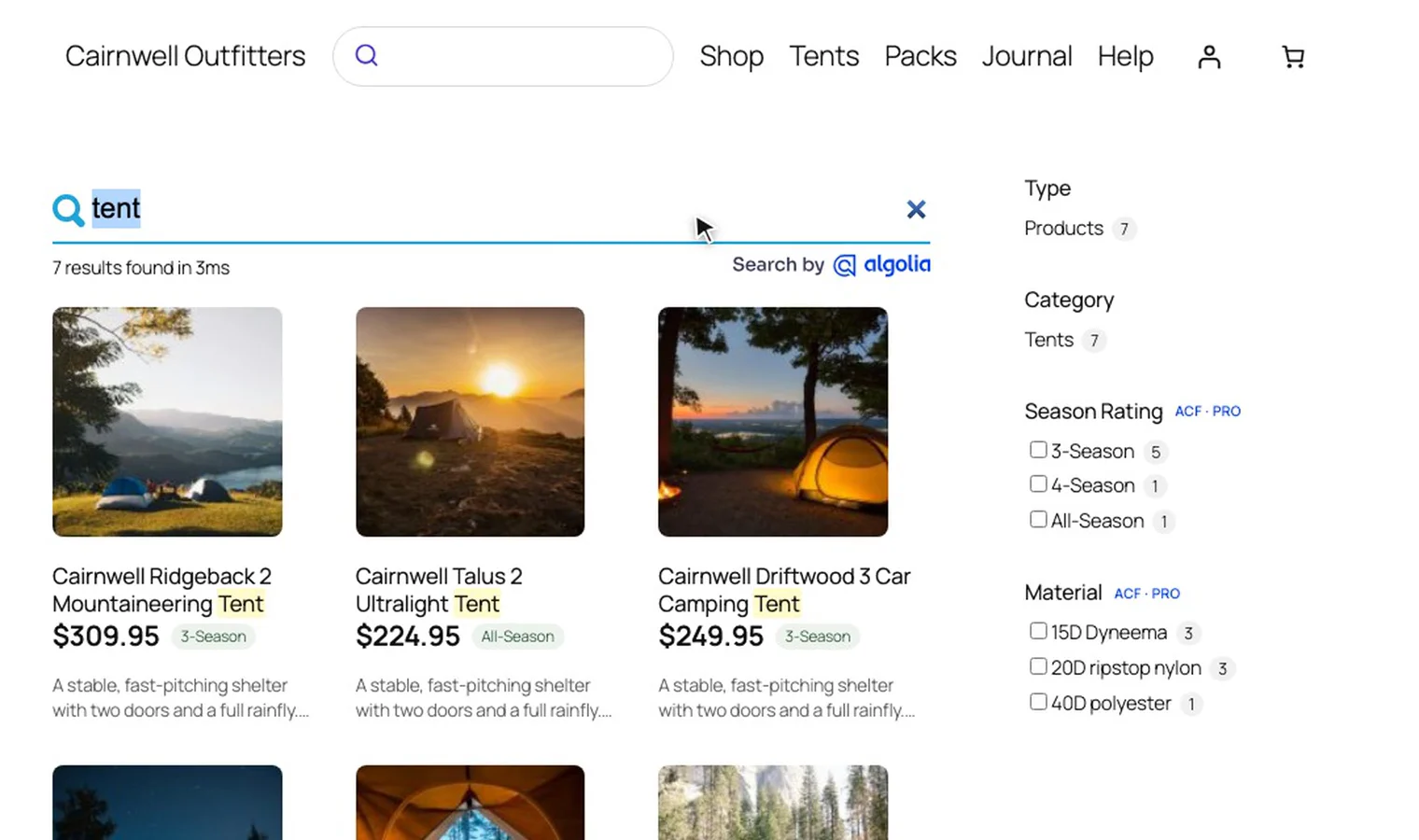
- Search by SKUShoppers and staff type a part number and land on the product. Typo tolerance stays off for SKUs so near-misses don’t match.
- Price and sale priceShown in Autocomplete and on the results page, and available for sorting and price filters.
- Rank by what sellsTotal sales and average rating go into the index so popular, well-reviewed products rise, even before Algolia’s AI has learned anything.
- Hide sold-out and hidden productsSkip out-of-stock items and anything set to Shop only or Hidden. Customers stop clicking dead ends.
- Products-only searchOne switch makes Autocomplete and the search page return products and nothing else.
- Stays in sync with imports1.8Changes made through the WooCommerce REST API, CSV imports or WP-CLI are queued and pushed to Algolia automatically.
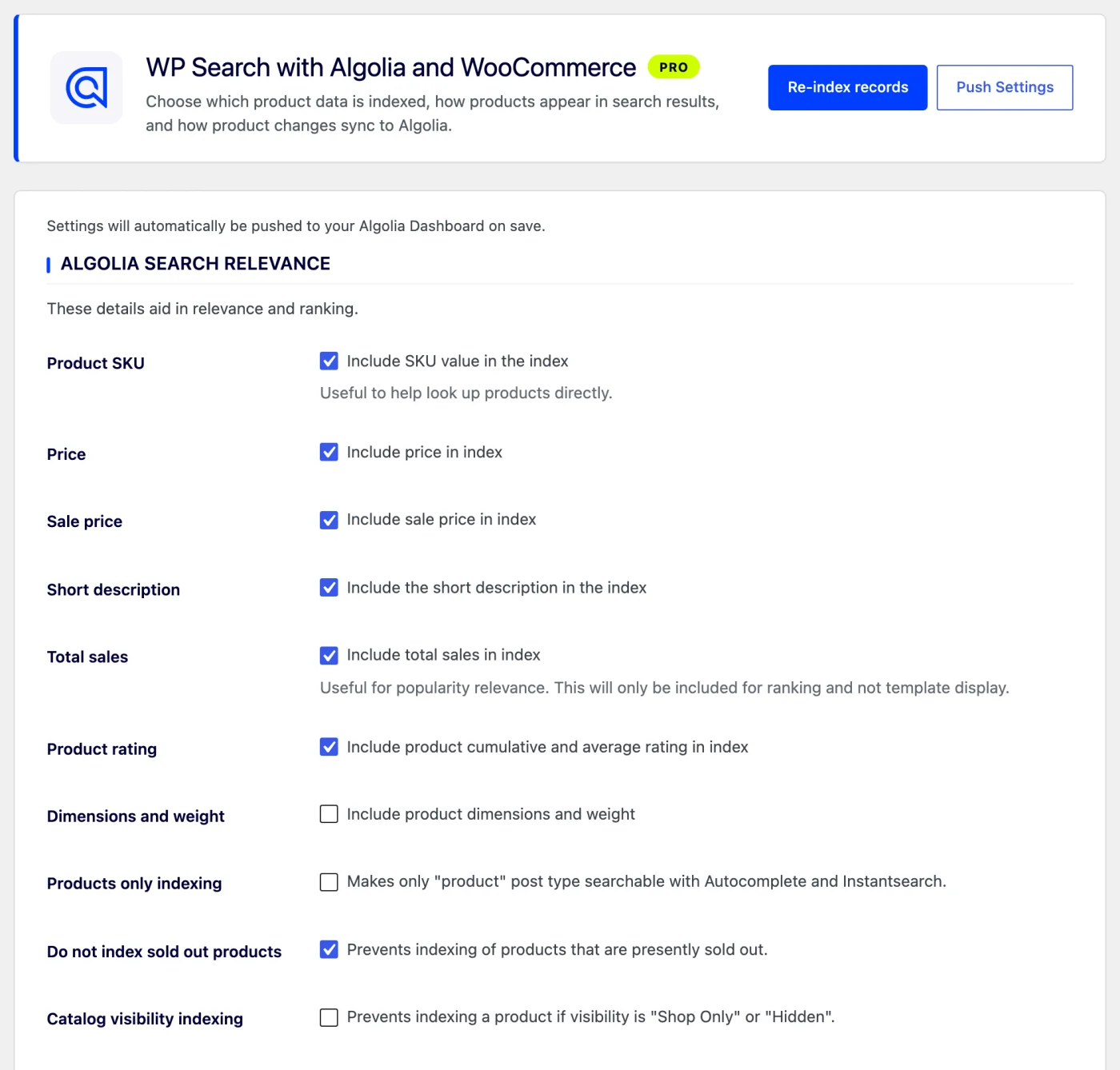
Real settings screen · every option is a checkbox, settings push to Algolia on save
Make your custom fields searchable without writing PHP
- Finds your fields for youDetects fields from Advanced Custom Fields, Meta Box, CMB2 and regular post meta.
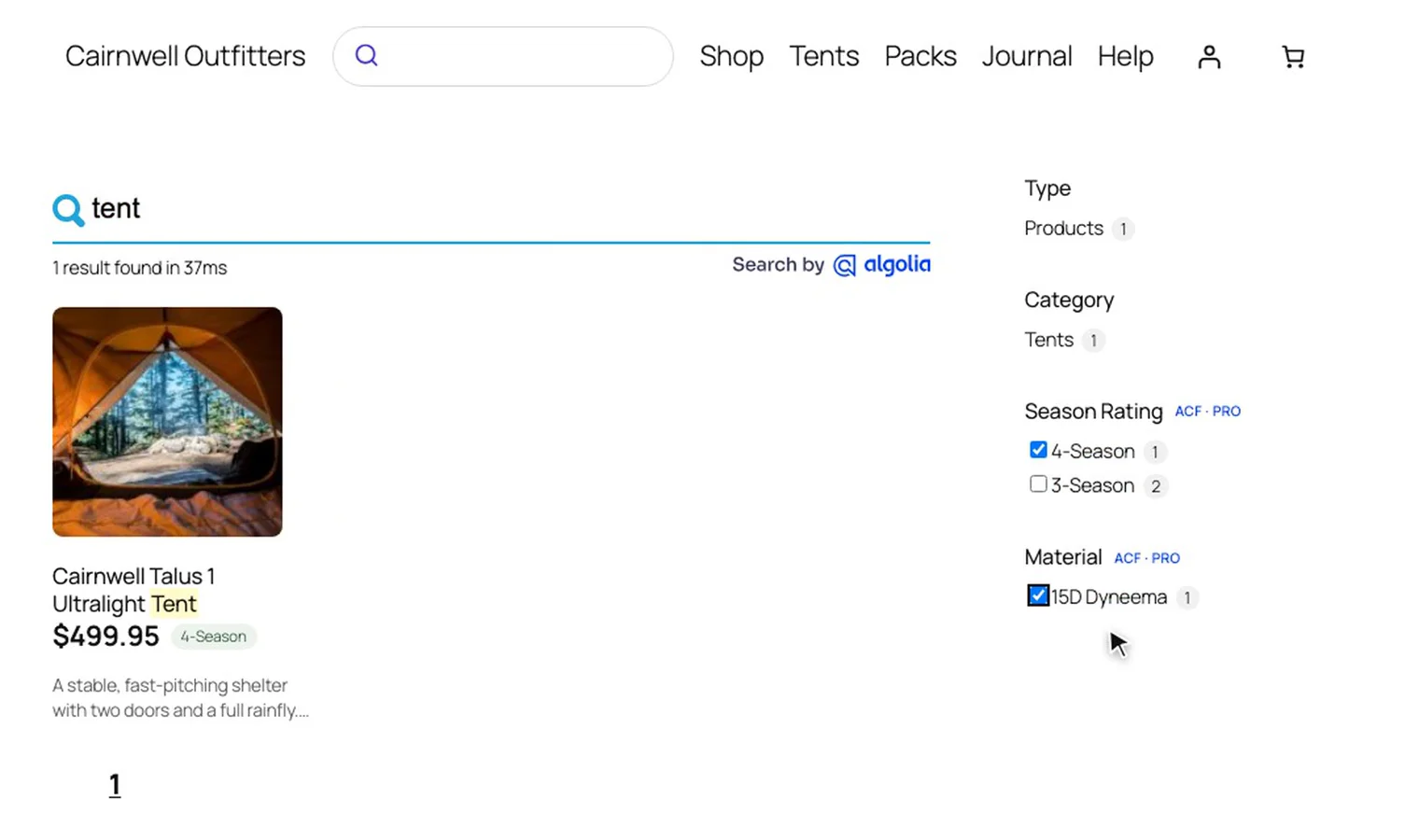
- Searchable or filterableSearchable fields match what people type. Faceting fields become filters like Material or Season on your results page.
- Order sets relevanceDrag to reorder. Fields higher in the list count more in Algolia’s ranking.
- Per post typeProducts, posts and any custom post type each get their own map.
- Re-index one post type1.8Update a single post type after a change instead of re-indexing the whole site.
- Plays nice with codeAnything your developer already adds with hooks keeps working. Mapped fields are added after.
Real recording · map ACF Material and Season Rating, save, then “dyn…” finds the Dyneema tents
Only index what should be found
What Pro keeps out of your index
Fewer junk records means cleaner results, and fewer records counted against your Algolia plan.
- Posts marked noindex in your SEO plugin automatic
- Individual posts you exclude one checkbox
- Taxonomies you don’t want searchable new in 1.8
- Sold-out products WooCommerce
- Shop-only and hidden products WooCommerce
- Sites you leave out of network search multisite
- Status on every postThe edit screen shows whether the post is in each index, with a Re-index button and an Exclude checkbox.
- Algolia HealthOne screen with record counts per index against the WordPress objects that should be there, and when each was last updated.
- Real error messagesWhen a re-index fails you see Algolia’s actual error, not “something went wrong.”
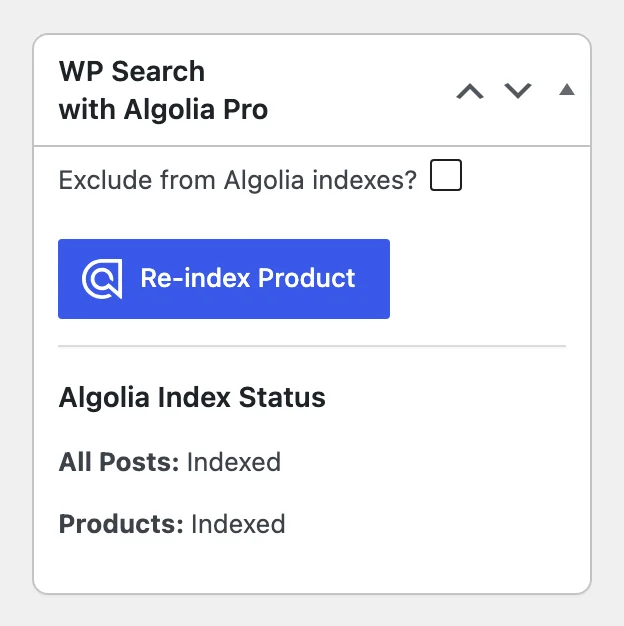
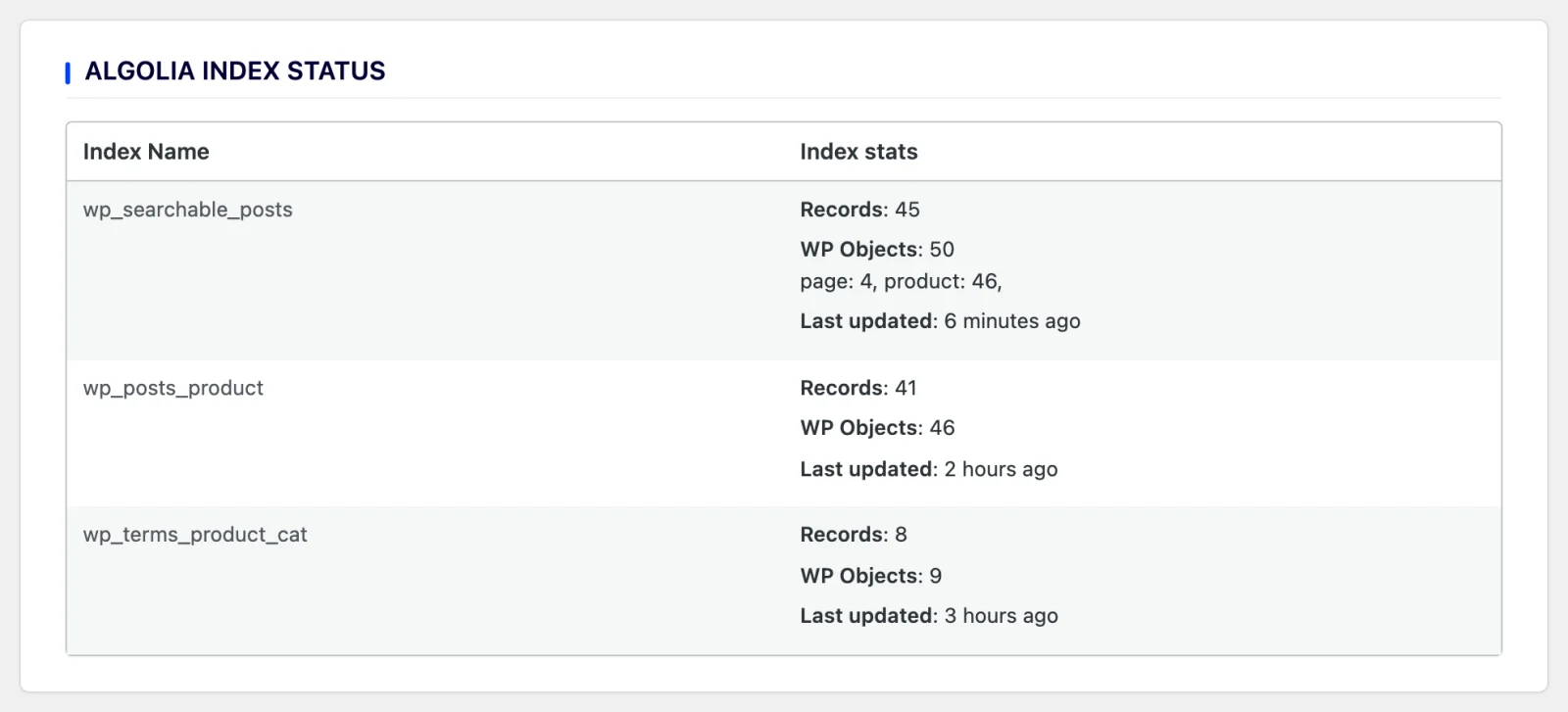
Real captures · index status per product and per index
One search box for your whole network
- Network-wide indexCreate, resume or rebuild it from Network Admin, with indexing status for every site.
- Pick the sitesLeave out internal, staging or archived sites with a click.
- Shared settingsNetwork-level Autocomplete and search settings so every site behaves the same.
- Safe on stagingIndexes for testing on WP Engine, Pantheon, Pagely and WordPress VIP dev URLs, even with search engines blocked.
Free and Pro, side by side
Pro runs on top of the free plugin and keeps everything you’ve already set up.
| Feature | Free | Pro |
|---|---|---|
| Search | ||
| Autocomplete and InstantSearch results page | Included | Included |
| Index posts, pages, custom post types and terms | Included | Included |
| Custom fields searchable and filterable, no code | Not included | Included |
| AI search | ||
| Clicks on search results sent to Algolia | Included | Included |
| Cart, checkout, order and coupon events | Not included | Included |
| Sales tied back to the search that led to them | Not included | Included |
| Conversion data for Dynamic Re-Ranking, Personalization, NeuralSearch and Recommendations | Clicks only | Included |
| WooCommerce | ||
| SKU, price, sale price and short description in the index | Not included | Included |
| Rank by total sales and rating | Not included | Included |
| Hide sold-out, shop-only and hidden products | Not included | Included |
| Sync REST API, CSV import and WP-CLI changes | Not included | Included |
| Control | ||
| Respect noindex from 5 SEO plugins | Not included | Included |
| Exclude single posts and whole taxonomies | Not included | Included |
| Index status and re-index on each post | Not included | Included |
| Algolia Health screen | Not included | Included |
| Network-wide search across a multisite | Not included | Included |
| Support | Forums | Priority, from the plugin’s developers |
Requires WordPress 6.5+, PHP 8.1+ and the free WP Search with Algolia plugin. Algolia account required (Algolia has a free plan).
Actively developed
- NEWWooCommerce events for cart, product clicks, checkout and coupons, with a new Events screen.
- NEWProduct sync for changes made through the REST API, imports and WP-CLI.
- NEWExclude Taxonomies screen.
- NEWRe-index a single post type from the Field Mapper.
- FIXRe-index errors now show Algolia's real message.
Every Pro feature, one price
Billed yearly for one site. Your Algolia plan is separate and billed by Algolia. Already a customer? Your subscription keeps its current billing.
- ACF, Meta Box and CMB2 fields searchable, no PHP
- Noindex, exclusions and index health
- One search across a multisite network
- WooCommerce search by SKU and price
- Sold-out products kept out of results
- Search-to-sale events, so Algolia ranks what sells
- Updates and priority support
- From the team that maintains the free plugin

Built by WebDevStudios, the team that maintains WP Search with Algolia
We took over WP Search with Algolia when Algolia stepped back from it, and we’ve kept it running on thousands of sites since. Pro is built, tested and supported by the same engineers who build Algolia search for our enterprise clients.
Want it built for you? Our team does this every day.
WebDevStudios builds Algolia search for universities, enterprise brands, busy WooCommerce stores and small businesses. Whether you need a hand getting set up or a fully custom search experience, we can help.








Before you buy
Do I need the free plugin and an Algolia account?
Yes to both. Pro adds to free WP Search with Algolia, and your content is indexed in your own Algolia account. Algolia has a free plan to get started; Pro doesn’t change what Algolia charges you.
Does Pro add AI search?
Algolia provides the AI: Dynamic Re-Ranking, Personalization, NeuralSearch and Recommendations. Those features learn from what shoppers do. Pro sends Algolia that behaviour, including carts, checkouts and orders tied to the search that led to them, plus richer product data. You turn the AI features on in your Algolia dashboard, and some depend on your Algolia plan.
Will installing Pro change my current search?
No. Your indexes, Autocomplete and search page keep working as they are. Pro’s features are off until you turn them on.
Do I need WooCommerce?
No. The Meta Field Mapper, SEO noindex support, exclusions, index health and multisite search work on any WordPress site. The product settings and events appear when WooCommerce is active.
Which custom field plugins work with the Field Mapper?
Advanced Custom Fields, Meta Box and CMB2, plus regular post meta from any plugin or your own code.
How does multisite work?
Network-activate Pro to get the network settings and the network-wide index.
What happens if I don’t renew?
Search keeps working. You stop receiving updates, including security and compatibility releases, and priority support.
Can I try it first?
Pro has a 30-day refund guarantee. If it’s not right for you, email us for a full refund.