

At WebDevStudios/Pluginize, we have been building WordPress products for a long time. We have watched Custom Post Type UI grow from a simple developer utility into one of the most installed plugins in the entire WordPress ecosystem, more than one million active sites, a community of contributors, and over a decade of continuous updates. That kind of trust is not something we take lightly.
When we decided to build a Pro version, we did not rush it. We listened. We watched how real site owners used CPT UI. We paid attention to the support tickets, the feature requests, the workarounds people had stitched together just to do things that should have been simple. We asked ourselves one question over and over again: what does it actually take to go from registering a post type to running a fully functioning content experience on your site?
The answer became Custom Post Type UI Pro!
More than a million sites. One missing piece.
CPT UI has always been great at one thing: helping you create custom post types and taxonomies without writing code. That foundation is rock solid, and it is not changing. The free plugin will always be free. The million-plus sites relying on it today have nothing to worry about.
But here is what we heard from those sites again and again: registration is just the beginning.
Once your post types exist, a whole new set of challenges appears. How do you display your custom content on the front end without hiring a developer? How do you help your editors actually find and manage hundreds of custom posts efficiently? How do you keep your post type structure consistent if you are running five, ten, or fifty WordPress sites? How do you make the whole thing feel like it belongs together instead of a collection of workarounds?
Those are the problems CPT UI Pro was built to solve, and it solves all of them in one plugin.
What CPT UI Pro actually does
Display your custom content – beautifully, in the block editor
This is the one that site owners have been asking for the longest. Your custom post types hold some of your most important content like portfolios, team members, products, resources, events, and getting that content onto the front end of your site has always required either a page builder, a custom theme, or a developer writing template files.
Not anymore.
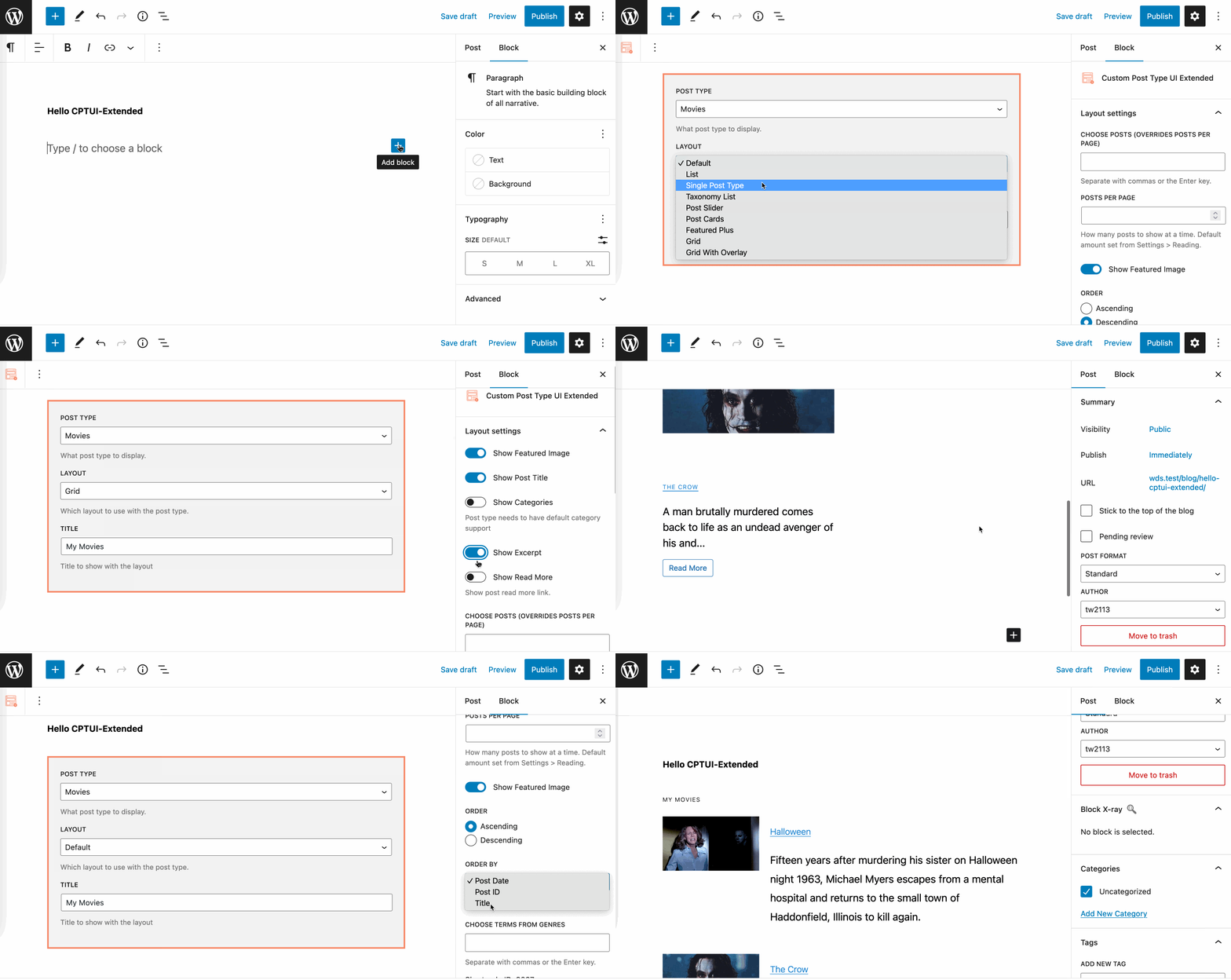
CPT UI Pro ships with a powerful custom block built directly into the WordPress block editor. Select your post type, choose a layout, and publish. No shortcodes, no custom templates, no page builder required.
Ten layout options built in! The CPT UI Pro block comes loaded with display layouts ready to use out of the box:
- Default – A clean, straightforward display that works for any post type
- List – A structured, scannable list view ideal for directories, resources, or archives
- Single Post Type – Focused display for surfacing one specific post type with full control over output
- Taxonomy List – Display and browse content organized by your custom taxonomy terms
- Post Slider – A sliding layout for featured or promotional content
- Post Cards – Card-based grid layout, great for portfolios, team pages, and visual content libraries
- Featured Plus – Lead with a featured post at full width, followed by supporting posts below
- Grid – A clean uniform grid for browsing large content collections
- Grid With Overlay – Grid layout with text overlay on images, perfect for visually rich post types like films, events, or properties
Per-block layout controls. Every block instance is independently configurable from the WordPress sidebar. Choose which posts to display by ID, set posts per page, toggle the featured image on or off, and set sort order to ascending or descending, all without leaving the editor.
The Taxonomy Filter Blocks take it further – add interactive filters to any page so your visitors can browse and narrow down content by category, tag, or any custom taxonomy you have registered.
And the Shortcode Builder means you can drop any display configuration anywhere on your site in a page, a widget area, or even inside another plugin, with a clean, reusable shortcode. The shortcode builder makes CPT UI Pro fully compatible with “Classic WordPress” websites and the WYSIWYG editor. Build it once, use it everywhere.
Gutenberg custom block included in Custom Post Type UI Pro to easily display your post type content.
Give your editors the admin experience they deserve
Anyone who manages content in WordPress knows the frustration of a cluttered, limited list screen. The default WordPress admin table shows you a title, a date, and maybe a category. For simple blog posts, that is fine. For a post type with dozens of custom fields, it is nearly useless.
CPT UI Pro completely rethinks the admin list table experience for custom post types.
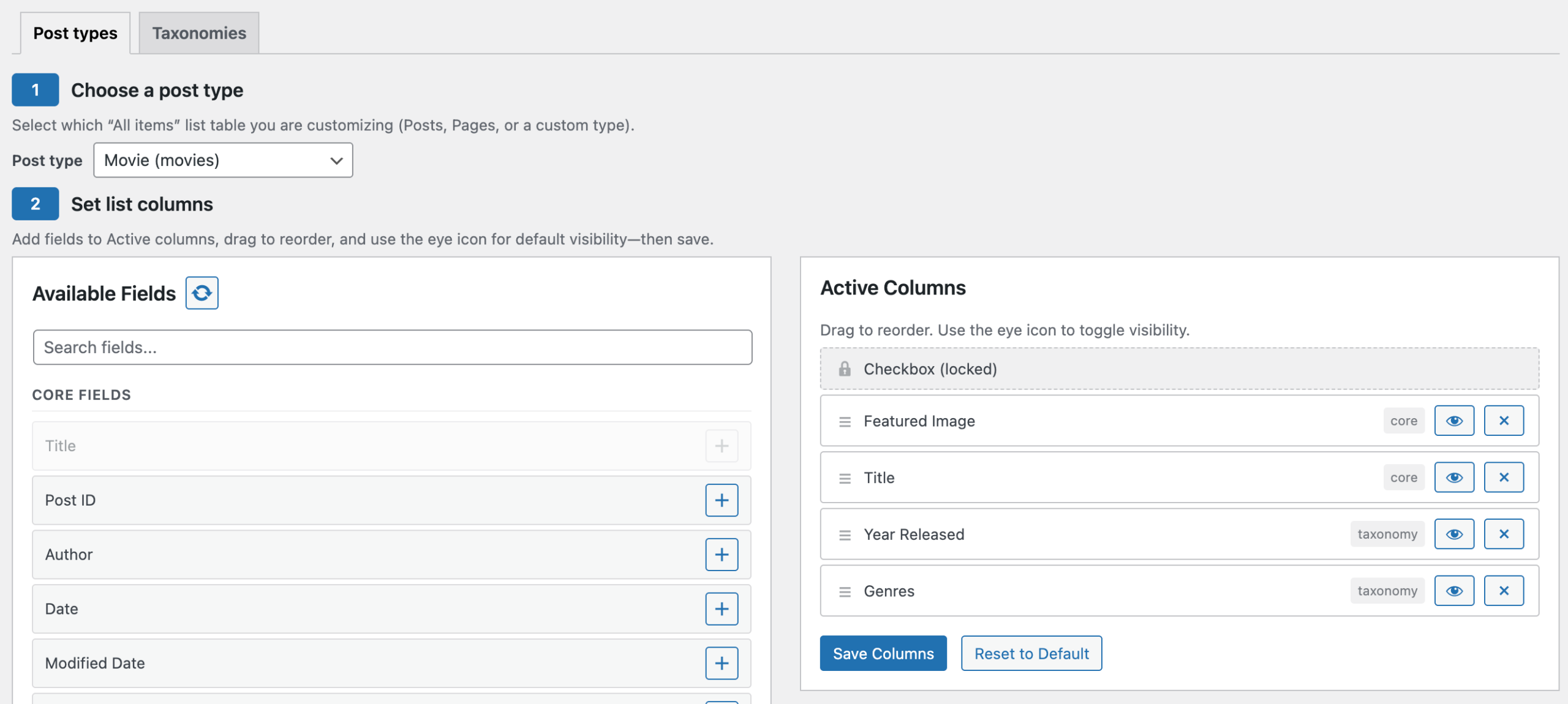
The Column Builder lets you choose exactly which columns appear on any post type list screen and reorder them with simple drag and drop. Show the fields that matter to your editors. Hide the ones that do not. No code, no extra plugins, no theme functions.php hacks.
Advanced Filters put powerful search directly in your admin table. Filter your content by taxonomy, custom field value, date range, author, or status — and combine them to find exactly what you are looking for in large content libraries. If you have ever managed an archive of hundreds of custom posts and wished you could just filter by a specific term or field, this is for you.
The Screen Options Panel means every member of your team can configure their own view. An editor who manages one post type does not need to see the same columns as the developer who manages everything. CPT UI Pro respects individual workflows.
Easily set the columns displayed in the admin dashboard for your custom post type
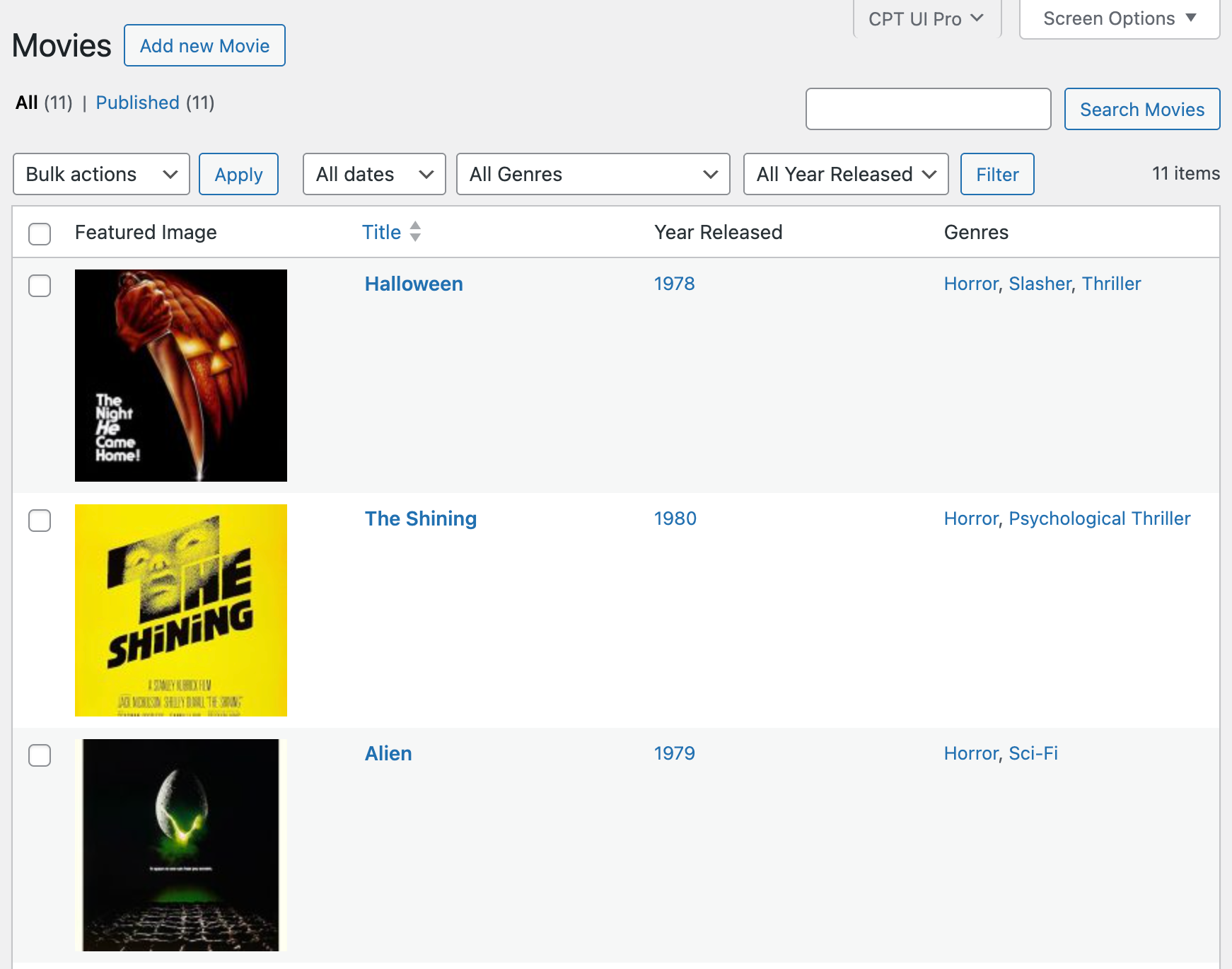
Customize your CPTs to only show the content you need to see in the post listing screens.
Manage your entire WordPress Multisite network from one place
For those running WordPress Multisite, agencies managing client networks, publishers running multiple properties, organizations with many regional or departmental sites, maintaining consistent post type structure across subsites has always been a manual, error-prone process.
CPT UI Pro changes that with first-class Multisite support.
Register your post types and taxonomies once at the network level, and they are available everywhere. Use the Push Config to Subsites feature to distribute your content structure across your entire network in one action, keeping every site consistent without touching each one individually.
And when a subsite needs to do something slightly different, per-site inheritance controls let you override network defaults at the subsite level. Full consistency where you need it, full flexibility where you want it.
A better plugin for developers too
CPT UI Pro is approachable enough for site owners and powerful enough for developers building on top of it.
The cptui_pro_post_types filter gives developers precise programmatic control over registrations, merge in post types from other sources, modify configs at runtime, or replace them entirely. Auto-discovery hooks let themes and plugins register CPTs automatically without manual setup steps. And the programmatic registration API means your post type configuration can live in a JSON file, a version-controlled config, or a CI/CD pipeline, not just the database.
Extended REST API support builds on CPT UI’s existing REST capabilities, giving developers additional controls and endpoints for headless WordPress builds and API-driven applications.
This is just the beginning
CPT UI Pro version 1.0 is a complete, production-ready plugin. But we are already thinking about what comes next. The roadmap includes deeper WooCommerce integration, white-labeling options, additional block editor components, expanded REST API capabilities, and more, all informed by the same community feedback that shaped this first release.
If you have been using CPT UI free and have ever wished it could do more, now it can.
Get CPT UI Pro today
CPT UI Pro is available now exclusively on Pluginize.com, WebDevStudios home for premium WordPress products.
Get CPT UI Pro on Pluginize.com →
Have questions before you buy? Check out the full documentation or reach out to our team directly. We are proud of what we built and we are happy to talk about it.
The free Custom Post Type UI plugin remains available on WordPress.org and will continue to be actively developed and supported. CPT UI Pro is an optional add-on for users who want to go further. Your existing setup changes nothing, Pro only adds.