

You asked, and we delivered. WP Search with Algolia Pro 1.7 revolutionizes your search experience with a powerful no-code Meta Field Mapper, seamless conversion revenue tracking for WooCommerce, and real-time index monitoring, all accessible directly within your WordPress dashboard.
Here is what’s new in WP Search with Algolia Pro 1.7:
Meta Field Mapper: your custom fields are finally searchable
This is the big one, and it’s the feature Pro users have asked for most.
What it means in practice. Say you sell outdoor gear. Every product has custom fields for material, waterproof rating, and weight. A customer searches “waterproof jacket.” Algolia looks at the product title and description, finds nothing, and shows an empty results page. The waterproof rating you carefully filled in for 400 products isn’t in the search index, so it may as well not exist. That customer leaves and buys somewhere else.
Fixing that used to mean writing a PHP filter, getting it reviewed, deploying it, and triggering a re-index. A week of calendar time, minimum, and that’s if a developer is free.
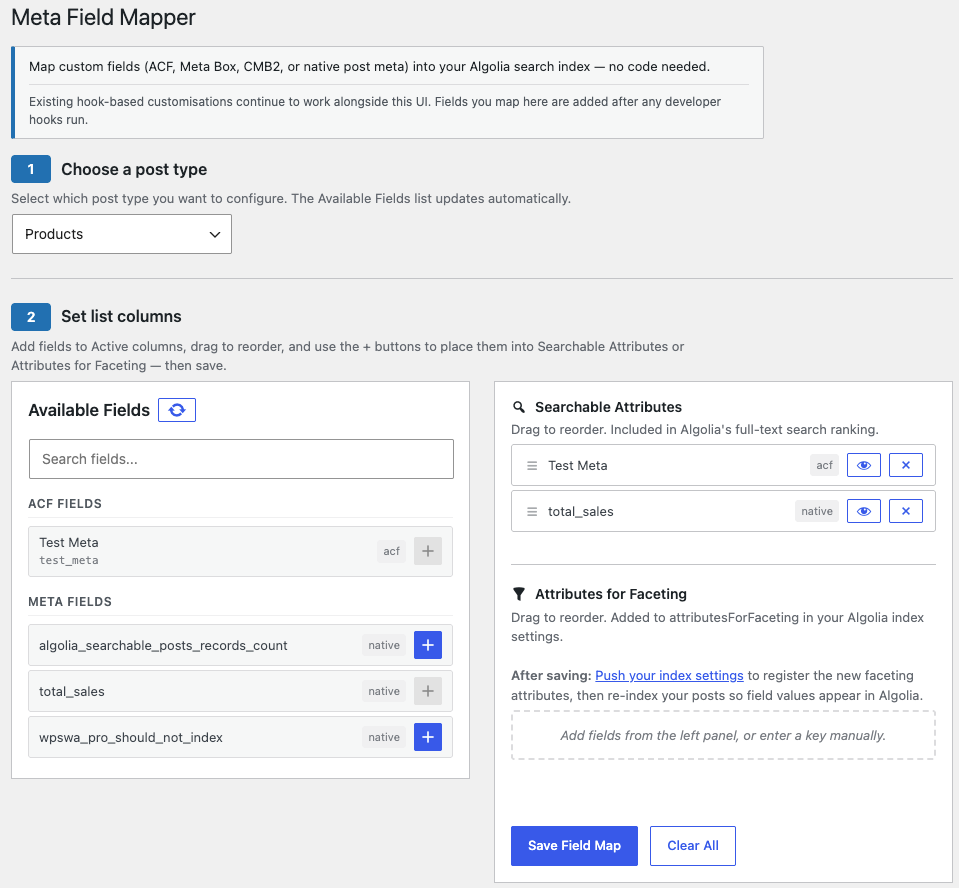
In 1.7, you open Algolia → Meta Field Mapper, find waterproof_rating in the list of fields the plugin detected on its own, drag it into Searchable Attributes, and save. Trigger a re-index to include the newly configured custom fields you want index. That customer now finds the jacket.
Elapsed time: about as long as it took to read this section.
| WordPress Algolia Meta Field Mapper
How it works. The mapper auto-detects fields from Advanced Custom Fields (ACF), Meta Box, CMB2, and native WordPress post meta. You drag each field into one of two columns. Searchable Attributes are fields Algolia matches queries against. Attributes for Faceting are fields visitors can filter by. Order the searchable list however you like, because position controls how heavily Algolia weights each field. Every post type gets its own configuration. |
|
What this looks like on your site:
- Real estate. Buyers filter listings by bedrooms and neighborhood instead of scrolling through 300 results.
- Job boards. Salary range and remote status become filters, not fine print.
- Membership directories. Members find each other by specialty and region.
- Publishers. Search reaches author bios, series names, and every other field your editors fill in and no one can currently search.
Already have custom indexing code? It keeps working. Mapped fields are added after anything supplied through the algolia_post_shared_attributes hook, so the UI never overwrites your developer’s work. You can hand this screen to your marketing team without touching an existing build.
Know what your search is actually worth
WooCommerce stores get conversion tracking in 1.7. When an order completes, Pro sends an event to Algolia connecting that purchase back to the search that produced it.
You stop guessing whether search matters to your store and start seeing revenue attributed to specific queries. That’s a number you can bring to a budget meeting.
It compounds, too. Algolia’s Personalization and Dynamic Re-Ranking features run on exactly this event data. Stores sending conversion events get search results that improve on their own over time. Stores sending nothing get the same results they had on day one, forever.
Fix indexing problems where you find them
| Re-index a Single Post in Algolia
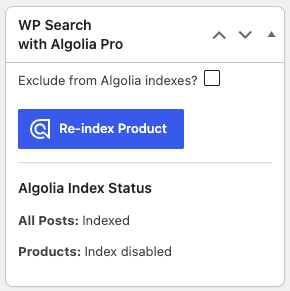
Every post edit screen now shows whether that post is in your search index, with a re-index button beside it. “Why isn’t my article showing up in search?” is the most common question your search setup will ever generate. In 1.7, the editor who asks it can see the answer and fix it themselves, next to the Publish button. |
|
One screen that explains what’s wrong
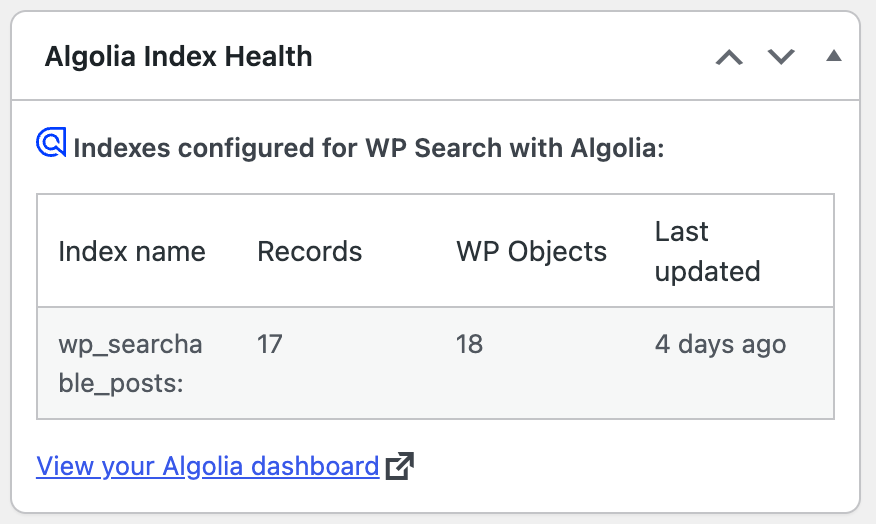
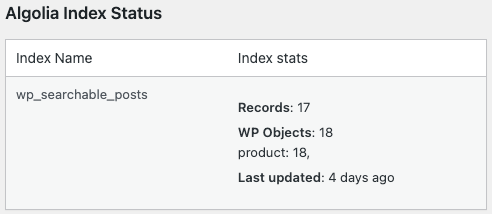
The new Algolia → Health page, plus a dashboard widget, reports your plugin versions, PHP and WordPress versions, detected environment, whether your API credentials are in place, and which of your indices actually exist on Algolia’s side.
It also shows whether each Algolia constant is coming from code or from the database. That single table resolves most cases of “search works on staging but not production,” which is otherwise an afternoon with SSH and a support thread.
|
|
|
Also in 1.7
- Exclude specific sites from network-wide multisite indexing, no code required
- Indexing status column in the network site list
- ACF fields on brand new posts now index correctly on first save
- Confirmation notice when SEO settings save
- PHP 8.0 is now the minimum requirement
Download WP Search for Algolia Pro 1.7
Current customers: update from your Plugins screen.
Still on the free plugin? The Meta Field Mapper alone is the difference between search that reads your content and search that reads your data.