
Someone searches your store for “tent.” You sell eight tents, and every one of them is a good match. So which one shows up first?
With most store search, the answer has nothing to do with sales. Results are ranked by how well the words match, plus any custom ranking you set up by hand. The tent that shoppers click on and leave behind can sit above the tent they actually buy, every day, until somebody notices and moves it.
This is the problem WooCommerce AI search should solve, and Algolia has a feature built for it, called Dynamic Re-Ranking. It watches what shoppers do after they search and moves the products that convert to the top for that search, automatically. The catch is that it can only learn from data you send it. That’s where WP Search with Algolia Pro comes in.
Here’s what that looks like for a “tent” search, on day one and after a month of sales:
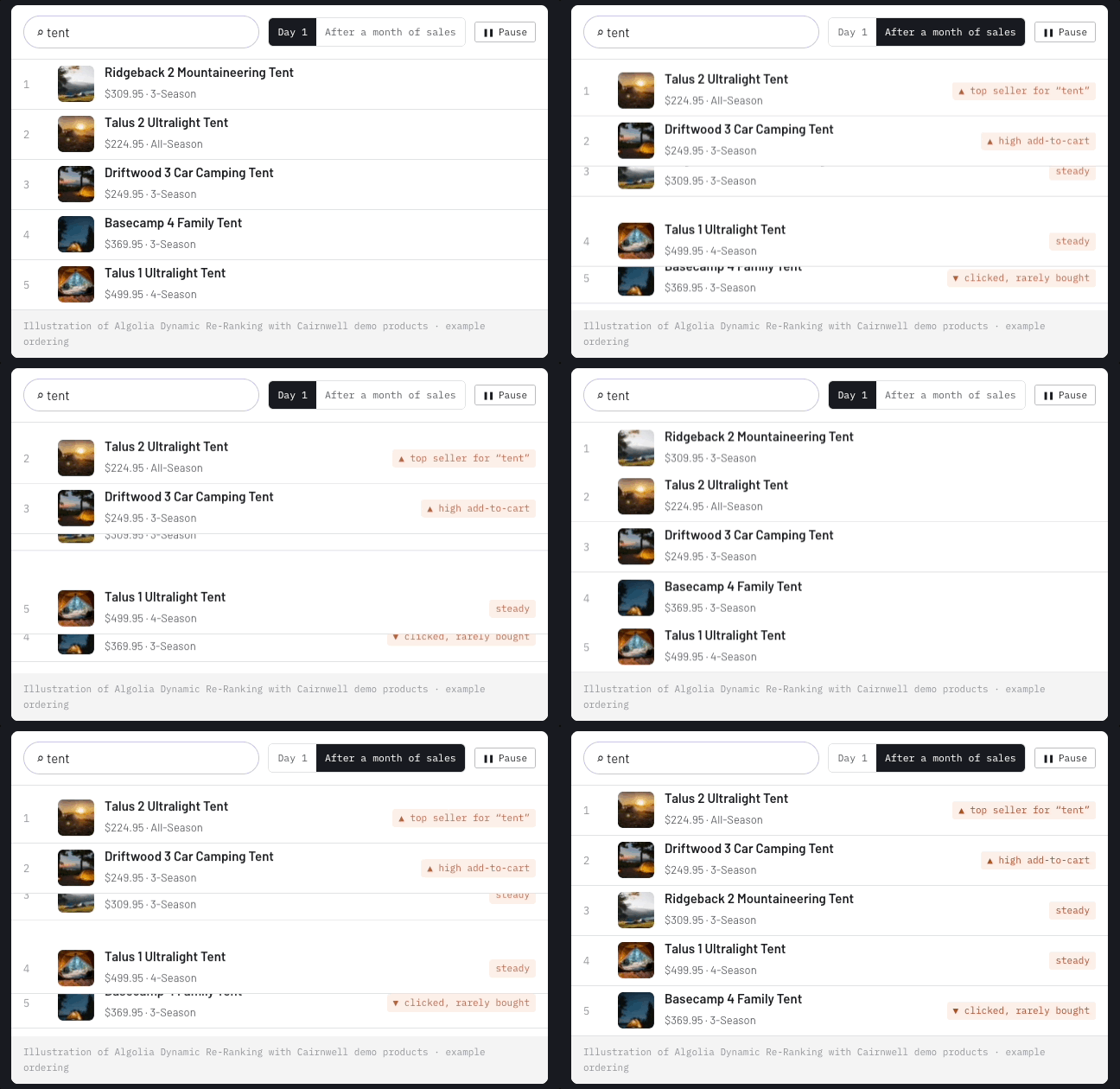
An illustration of Dynamic Re-Ranking using products from our Cairnwell demo store, not data from a real store.
What Dynamic Re-Ranking does
Dynamic Re-Ranking is part of Algolia’s AI toolset. It looks at recent click and conversion events and reorders the results for each individual search query. “Tent” gets its own ordering. “Rain jacket” gets its own ordering. Nobody has to maintain a merchandising spreadsheet.
A few things worth knowing about how it works, straight from Algolia’s documentation:
- It only reorders products that already match. It won’t push an unrelated best seller into a search where it doesn’t belong.
- Your existing setup still applies. Re-ranking runs after Algolia’s normal relevance, filters, and custom ranking. Pinned and hidden results still win.
- It refreshes daily by default, so the order keeps up as buying patterns change.
To be clear about who does what: Algolia provides the AI. Our plugin’s job is to feed it the right data from your WooCommerce store.
Re-ranking is only as smart as the data you send it
Dynamic Re-Ranking learns from events. A click on a search result is an event. An add to cart is an event. A completed checkout is an event. For Algolia to use them, each event has to be tied to the specific search that led to it, using a query ID from that search.
Algolia says re-ranking can work with click events alone, but it performs better when you send both clicks and conversions. That makes sense. A click tells Algolia a product looked interesting. A purchase tells Algolia it was the right answer.
Here’s how that breaks down in the plugins:
- WP Search with Algolia (free) sends clicks on search results to Algolia Insights.
- WP Search with Algolia Pro adds the conversion side for WooCommerce: Product Added to Cart, Product Removed from Cart, Checkout Completed, Checkout Cancelled, and coupon events.
Pro also handles the hard part, which is attribution. It picks up the query ID from Autocomplete and from your search page and keeps it for Algolia’s 30-minute attribution window, so when a shopper searches, adds a product to their cart, and checks out, the sale is credited to the search that started it.
Checkout events are sent from the server, not the shopper’s browser. That means orders still count when they complete through a payment gateway callback or an admin order change, instead of quietly going missing.
Until Pro 1.8.0, getting WooCommerce conversion events into Algolia meant custom development. Now it’s a settings tab.
Follow one sale
Here’s the loop, using the Cairnwell demo store we built to show off the plugin:
- A shopper searches “tent.”
- They click the Talus 2 Ultralight Tent.
- They add it to their cart.
- They check out.
- Algolia gets every step, tied back to that “tent” search. As more shoppers make the same choice, the Talus 2 earns a higher spot the next time someone searches “tent.” That’s the shift you saw in the animation at the top of this post.
Does it move the needle? Algolia reports that French fashion retailer Gémo saw a 2.3× increase in conversions following the rollout of Dynamic Re-Ranking. Every store is different, but it shows what’s possible when search learns from what people buy.
The same data powers more than ranking
Once your store is sending click and conversion events, the same data feeds other Algolia features you can turn on:
- Personalization: returning shoppers see the brands and categories they buy first.
- NeuralSearch: understands searches like “warm tent for winter” even when no product description uses those words.
- Recommendations: models like “frequently bought together,” trained on your real orders.
- A/B testing: test ranking changes and judge them by orders, not just clicks.
- Search analytics: see which searches make money and which ones find nothing.
Some of these depend on your Algolia plan, and you turn them on in your Algolia dashboard. The events are the foundation for all of them.
Is your store ready for re-ranking?
Dynamic Re-Ranking needs enough activity to spot a pattern. Per Algolia’s documentation, a product has to collect roughly 20 clicks or 2 conversions for a given search within a rolling 30-day window before it can be promoted for that search. Algolia’s troubleshooting guide says re-ranking usually needs around 20,000 click and conversion events in the last 30 days to show an effect, though that varies by business.
So if your store gets steady search traffic, you’re in a good spot. If you’re still growing, start sending events now anyway. The data builds up from day one, and you get click and conversion analytics in Algolia right away, long before re-ranking kicks in.
Turn on WooCommerce AI search in four steps
- Enable Insights in the free plugin. WP Search with Algolia Pro uses the free plugin’s Insights connection.
- Install or update to WP Search with Algolia Pro 1.8.0 or newer. It requires WP Search with Algolia 3.0 or newer and PHP 8.1 or newer.
- Choose your events. Go to Algolia → Events and switch on the events you want to send. You can also choose which product fields to attach, such as SKU, price, and categories.
- Turn on Dynamic Re-Ranking in your Algolia dashboard. Availability depends on your Algolia plan, so check Algolia’s pricing page if you don’t see it.
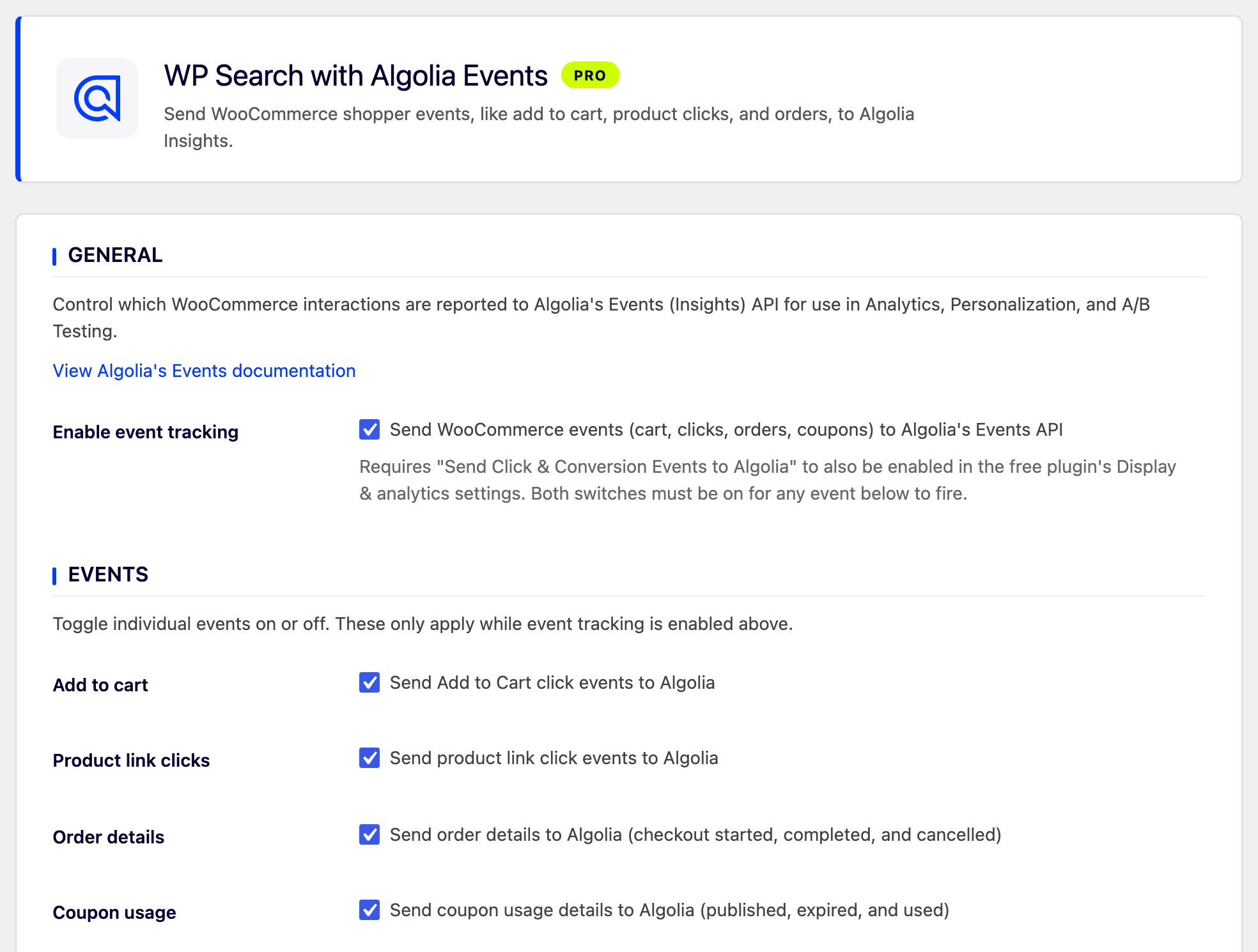
After setup, place a test order and check the Events tab in your Algolia dashboard to confirm events are arriving.
Let your best sellers find their way to the top
Your shoppers already tell you which products are the right answer every time they buy. WP Search with Algolia Pro makes sure Algolia hears it, so your search gets better on its own.
Already running the free plugin? Pro works alongside it, and installing it doesn’t change your current search until you turn features on.
Get WP Search with Algolia Pro
Want a team to set up Algolia AI on your store for you? WebDevStudios can help.